Sony Venice / Venice 2
Control Modes
bitbox supports Venice 1 and Venice 2 control via IP. This can be used with either the Web GUI or an RCP.
Connection (RJ45 Ethernet)
Venice 1
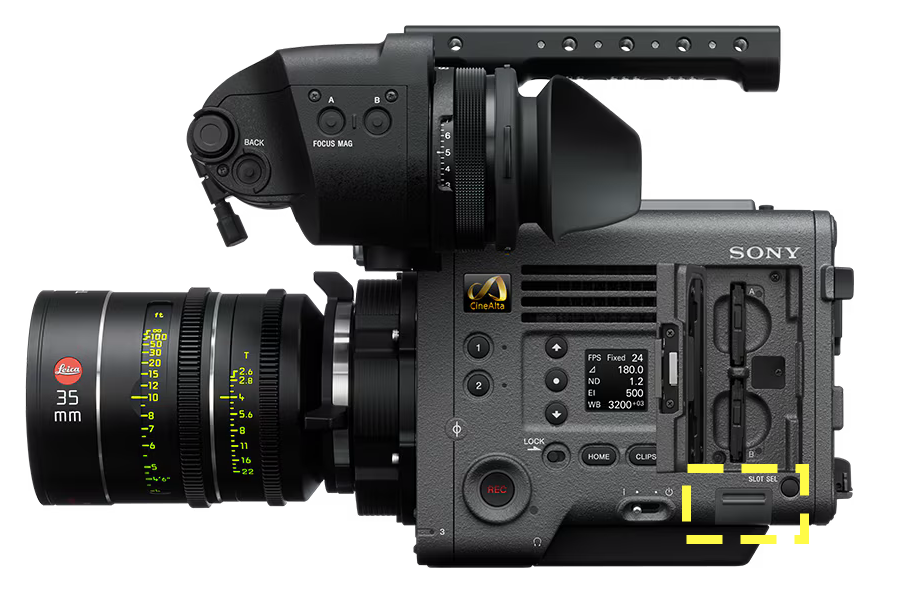
The Venice 1 Ethernet port is behind a door located on the operator side of the camera, directly under the SxS slots.
Venice 2
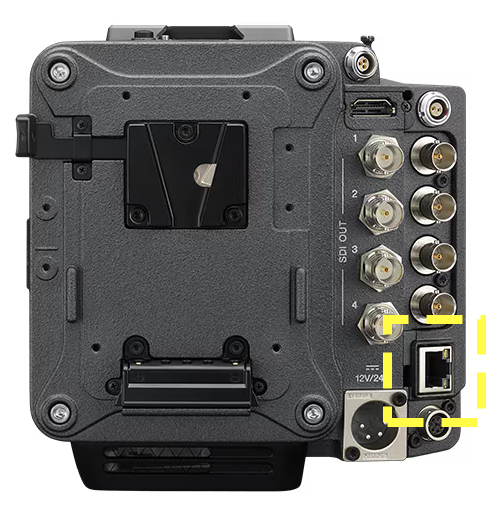
The Venice 2 Ethernet port is located on the back of the camera.
IP Address Configuration
Menu (Long Press)→Technical→Network- Change
SettingtoLAN, return to Network settings. - Under
Network→LAN- Set
DHCPtoOff - Configure
IPandNetmask
- Set
- Click
Setto confirm
For more information about IP addressing, please see IP Addressing.
Additional Step for RCP IP Control
bitbox and IP RCP are an exceptionally reliable pairing. The above network configuration remains the same, but additionally you will need to:
Menu (Long Press)→Technical→System Configuration- Set
RM/RCP Paint ControltoOn
Authentication Configuration
Venice and Venice 2 require authentication for Web UI control.
Menu (Long Press)→Technical→Authentication- Set
User NameandPassword
Sony offers a complete reset of the network settings, we recommend this step for unfamiliar Venice cameras. This will reset all network parameters as well as authentication information.
Menu (Long Press)→Maintenance→Network Reset- Select and confirm
Reset
Troubleshooting / Common Issues
Venice Ethernet not connecting to bitbox
You likely have an old firmware revision on your bitbox. There is a firmware fix available. Please email support@bitpart.com.
Browser Tiling - multiple WebUIs open on one window
With the Vivaldi Browser you can tile multiple tabs into one window for a single pane control of multiple cameras. Please see this article.
Connector Pinout
The Sony Venice and Venice 2 use the ANSI T568B standard with an 8P8C Ethernet "RJ45" connector, there is no special cable required for bitbox.
View: Looking at connector with clip facing down
| Pin | 1 | 2 | 3 | 4 | 5 | 6 | 7 | 8 |
| Color | ||||||||
| Function | TX+ | TX- | RX+ | — | — | RX- | — | — |